


meteoblue weather & maps
4.7345.00 Reviews
App Specs
- Version
- Cirrus Uncinus 2.12.02
- Updated On
- License
- Free
- Downloads
- 1,000,000+
- Developer
- meteoblue AG
- Categories
- Weather
- Platform
- Android, iOS
Screenshots
 Analysis by AppCompare
I like a weather app best when it helps me make a decision, not just admire a forecast. meteoblue weather & maps aims to serve both quick checks and deeper planning, with visual tools for people who want to understand how conditions may change. That balance is its strongest idea: I can look for a simple answer before heading out, then explore more detail when the day’s plans depend on it.
That extra detail is useful, but it also shapes who will enjoy the app. If you only want a large temperature and a simple rain alert, a basic weather app may feel quicker. If you like comparing the forecast across hours, locations, and map views, meteoblue gives you more to work with. I see it as a practical option for curious everyday users rather than a tool that makes every forecast effortless or certain.
First Impressions and User Interface
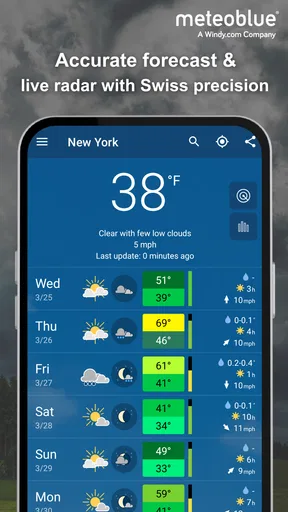
As soon as I fired up meteoblue weather & maps, I was greeted with a sleek, modern interface. You know how some weather apps can feel clunky or too data-heavy? Not this one. The design is clean and intuitive, which means you can find what you need without wading through unnecessary clutter. The main screen offers a quick overview of the current weather, which is super handy when you’re in a rush.
The app’s color scheme is easy on the eyes, with blues and whites predominating—perfect for a weather app, right? Navigating between different features is a breeze thanks to the user-friendly layout. Whether you’re a tech guru or someone who’s just smartphone-savvy, you’ll find your way around without any hiccups.
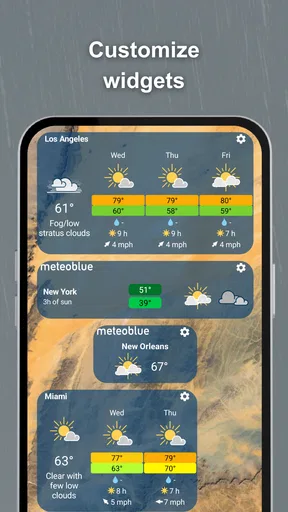
For a new user, I’d start with one familiar location and learn where the short-range outlook, maps, and longer forecast appear before adding several places. That small bit of orientation makes later checks faster: you can compare your home area with a destination without turning every forecast into a fresh search. It also helps keep the app’s more detailed views from feeling like a wall of weather information.
Features That Stand Out
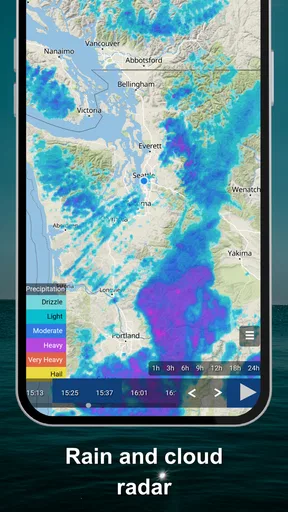
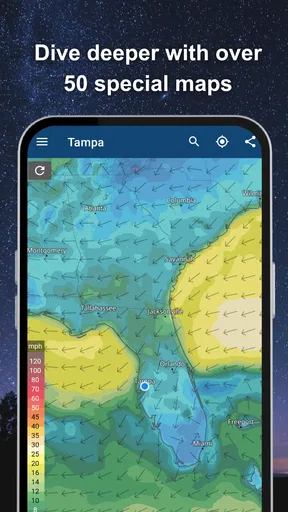
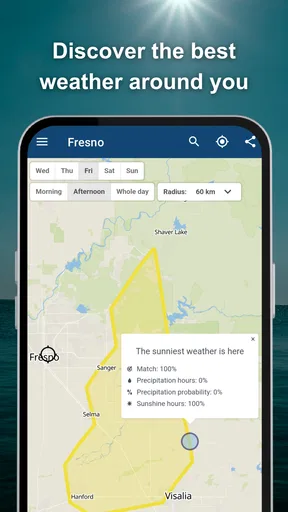
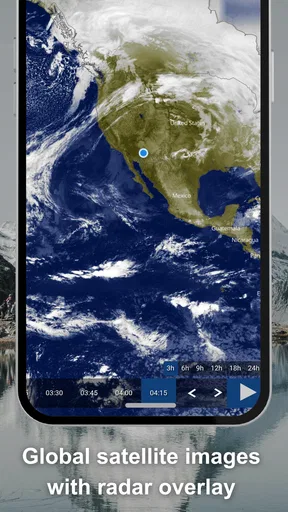
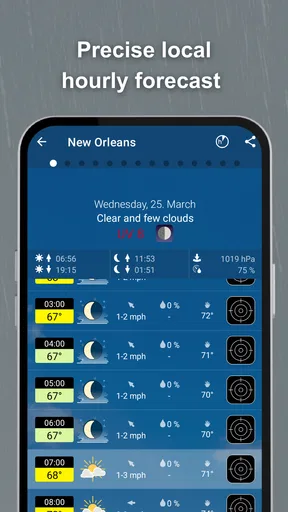
Let’s talk features. This app isn’t just about telling you if you need an umbrella today. It’s packed with detailed weather forecasts, radar maps, and even satellite imagery. The neat part? It offers forecasts for up to 14 days, so you can plan that weekend getaway with confidence.
I’d treat that longer outlook as a planning guide, not a promise. It can help me decide whether a trip is worth pencilling in, but I’d check again closer to departure before settling on outdoor plans. For a same-day decision, the near-term picture matters more; for a trip next week, the useful takeaway is often the broad trend rather than a precise hour-by-hour expectation.
Worth Reading Before You Choose

Flipboard Shows What News Apps Must Do Beyond the Feed

Switching to Android Auto Means Rethinking Your Driving Routine

Google Calendar Makes a Crowded Week Easier to Manage

Ludo King Makes the Most of the Minutes Between Plans

Baby Panda World Brings Quick Play to Modern Phones, but Its Game Library Feels Busy

ESPN’s Live Game View Makes Following Close Games Easier
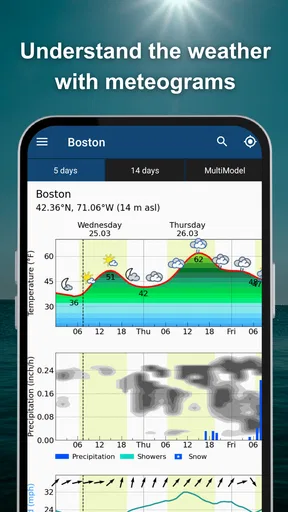
One feature I found particularly cool is the meteogram. It’s a visual representation of weather data over time, and it’s surprisingly easy to understand. Even if you’re not a weather expert, you’ll feel like one when you explain to your friends why the temperature is dropping.
The practical trick is to read the graph as a sequence rather than glance at one point in isolation. Before a walk, for example, I’d look for how the conditions develop across the time I’ll be outside, instead of checking only the current temperature. That can reveal a change that a single headline number hides. It does ask for a little attention, though; anyone who prefers one plain sentence may find the visual approach less immediate.
The app also provides air quality data, which is becoming more relevant these days. It’s always good to know how clean the air you’re breathing is, especially if you’re planning outdoor activities or have allergies.
That makes the app more useful for deciding when and where to spend time outdoors, particularly if air conditions matter to your routine. I would use that information as another input alongside the weather forecast, not as a substitute for personal health advice. Its value is in bringing a relevant environmental check into the same planning routine as temperature and rain.
Performance and Accuracy
Now, onto what really matters: performance and accuracy. Nobody wants a weather app that’s as unpredictable as the weather itself, right? Fortunately, meteoblue has a solid reputation for accuracy. The forecasts are updated frequently, so you’re always getting the latest info.
I tested the app in different locations, and it consistently delivered reliable forecasts. The radar and satellite imagery loaded quickly, even on my somewhat ancient phone. This was a pleasant surprise because, let’s be honest, not all apps are optimized for older devices.
Even a good forecast can differ from what happens at a particular street or moment, so I wouldn’t use any weather app as a guarantee. Maps and forecast views are most helpful when I need context; they are less useful if I expect them to settle every small uncertainty. When timing matters, my sensible routine is to check again before leaving rather than make a firm decision from an earlier glance.
For a realistic weekday example, imagine I’m deciding whether to cycle home or take a bus. I’d first check the near-term forecast, then use the map or visual timeline if the weather looks changeable. If the forecast suggests a wet spell later, I can leave earlier or bring a rain layer. The app supports that kind of flexible choice well, even though it cannot remove the need to adapt if conditions shift.
Why Choose meteoblue?
So, why should you choose meteoblue weather & maps over the countless other weather apps out there? For starters, it’s the perfect mix of simplicity and functionality. You get detailed weather insights without feeling overwhelmed by data.
Compared with the usual built-in weather app, meteoblue is appealing when I want to go beyond a quick temperature check and inspect maps or a visual forecast. A minimalist alternative may be better for someone who wants a glanceable answer with as little navigation as possible. The choice is less about one app being universally better and more about whether I value accessible detail enough to spend a few extra moments exploring it.
The app comes from meteoblue AG, a developer focused on weather, and it is a free weather app with optional in-app purchases priced at $5.99 per item. It has a 4.7 average from around 230,000 ratings, and has been installed over a million times. Those figures suggest that it has found a broad audience, but they do not tell me whether its more detailed style suits a particular person; trying the free version is the more useful test.
For someone wondering whether payment is necessary, I’d begin with the free experience and see whether the extra detail already answers their everyday questions. The optional purchases are there for people who want more, but I wouldn’t buy anything before identifying a specific feature or workflow that I actually need. It is also rated for Everyone, runs on operating systems from version 8.0, and its current release is Cirrus Uncinus 2.12.02.
Plus, the app is free to download, with optional in-app purchases. If you’re someone who loves diving into detailed weather data, you might find the premium features worth the investment. But even without them, the free version is more than sufficient for everyday weather needs.
Another thing I appreciated is the absence of intrusive ads. There’s nothing more annoying than an ad popping up just as you’re trying to check if you should grab a jacket. With meteoblue, you can enjoy a seamless, ad-free experience.
One limitation of a feature-rich weather app is that it can invite overchecking. A map, a graph, and a longer outlook each answer slightly different questions, and switching among them is not always worth it when I simply need to know whether to take a coat. I’d keep a quick-check habit for routine mornings and reserve the deeper views for trips, outdoor plans, or unsettled conditions. That way the extra information helps rather than slows me down.
Who Will Get the Most from It?
I’d recommend meteoblue to people who plan around the weather: walkers, cyclists, gardeners, travelers, and anyone whose day includes time outdoors. It is also a good fit for a curious user who likes seeing how a forecast evolves instead of relying on a single icon. The combination of maps, satellite imagery, air quality information, and the meteogram gives different kinds of users a reason to look beyond the opening screen.
It may not be the right choice for someone who wants nothing more than a basic daily high and low, or who finds charts and map layers distracting. A simpler alternative can be faster for that kind of routine. Likewise, if a decision is safety-critical, I would not rely on one app alone; I’d check appropriate official guidance and use the forecast as supporting information.
When planning a weekend away, I’d use the longer outlook to compare possible days, then revisit the forecast nearer the time and check the destination rather than assuming the conditions at home will match. That is a useful workflow for any trip where rain or changing temperatures could affect the plan. The main trade-off is that the forecast horizon is helpful for flexibility, not certainty.
Final Thoughts
All in all, meteoblue weather & maps is a fantastic app for anyone who wants a reliable, user-friendly weather app. Whether you’re planning a hike or just figuring out if you can leave the windows open, this app has got you covered.
My recommendation is specific: choose it if you want a clear starting point plus room to investigate maps, trends, and air quality, and you’re comfortable using a forecast as guidance rather than a guarantee. If you want the fastest possible glance with no extra exploration, a simpler option may fit better. For me, meteoblue earns its place when the weather affects a real plan, not merely out of habit.
So, what are you waiting for? Give meteoblue a try and see for yourself. You might just find that predicting the weather becomes your new favorite hobby!
Pros
- Accurate weather forecasts worldwide.
- Detailed maps with various layers.
- Customizable alerts for severe weather.
- Intuitive and user-friendly interface.
- Frequent updates with new features.
Cons
- Some features require a premium subscription.
- Occasional loading delays on older devices.
- Limited offline functionality.
- Ads can be intrusive in free version.
- Complex data may overwhelm casual users.
FAQs for meteoblue weather & maps
What features does the meteoblue weather & maps app offer?
The meteoblue weather & maps app provides users with detailed weather forecasts, interactive maps, and real-time data. It includes features like hourly updates, precipitation forecasts, temperature trends, and wind patterns. Additionally, the app offers radar overlays and satellite images to give users a comprehensive view of current and future weather conditions.
Is the meteoblue app free to use, or does it require a subscription?
The meteoblue app is free to download and use, offering a range of basic features at no cost. However, for access to premium features such as advanced weather models and in-depth data analysis, users may need to subscribe to a paid plan. Subscriptions can be managed directly through the app store.
How accurate is the weather data provided by the meteoblue app?
Meteoblue is known for its high accuracy, utilizing multiple data sources and advanced meteorological models. The app provides precise forecasts by integrating data from weather stations, satellites, and global weather models. Users can expect reliable information, but it's always wise to check multiple sources for the most critical decisions.
Does the meteoblue app support offline usage?
The meteoblue app primarily relies on an internet connection for real-time data and updates. While some cached information might be available offline, the app's full functionality, such as live radar and updated forecasts, requires an active internet connection to ensure accuracy and timeliness.
Can I customize the weather alerts in the meteoblue app?
Yes, the meteoblue app allows users to customize alerts based on their preferences. You can set up notifications for specific weather conditions, such as severe storms, heavy rain, or extreme temperatures. This feature helps users stay informed about significant weather changes that might affect their plans.


